Separate consoles
Constellation’s findings, runtime events and compliance results are in Constellation’s console. Astronomer’s console does not show them.
ASTRONOMER SOLUTIONS / ASTRONOMER + CONSTELLATION
Astronomer adopts, standardizes and operates your clusters. Constellation, AlphaBravo’s Kubernetes security platform, scans, watches and guards them. Today they connect through Astronomer’s catalog: Constellation installs on managed clusters as a curated application, with settings and admission defaults prepared for Astronomer’s platform tools.
Both products alpha · Installs from Astronomer’s catalog01 / FROM THE CATALOG
Constellation is one of the 21 curated applications in Astronomer’s catalog, declared as a first-party artifact. Install it on a managed cluster from that cluster’s Apps page, like any other curated app.
The install is an ordinary Astronomer delivery: you review immutable values, Astronomer releases them, and Flux on the cluster reconciles the Helm release. Upgrades, history and drift follow the same path as the rest of your platform components.
astronomer-constellation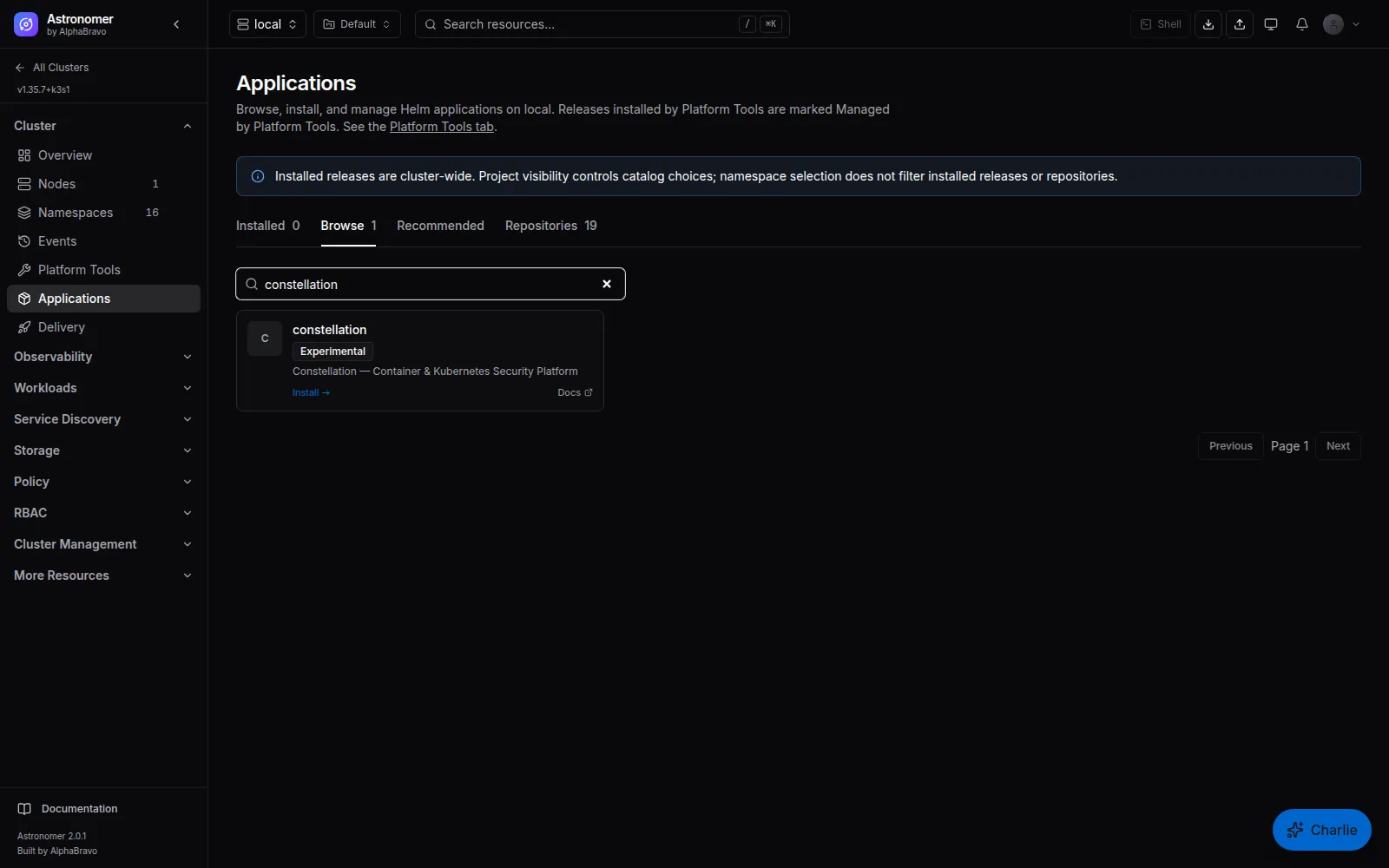
02 / INSTALL SETTINGS
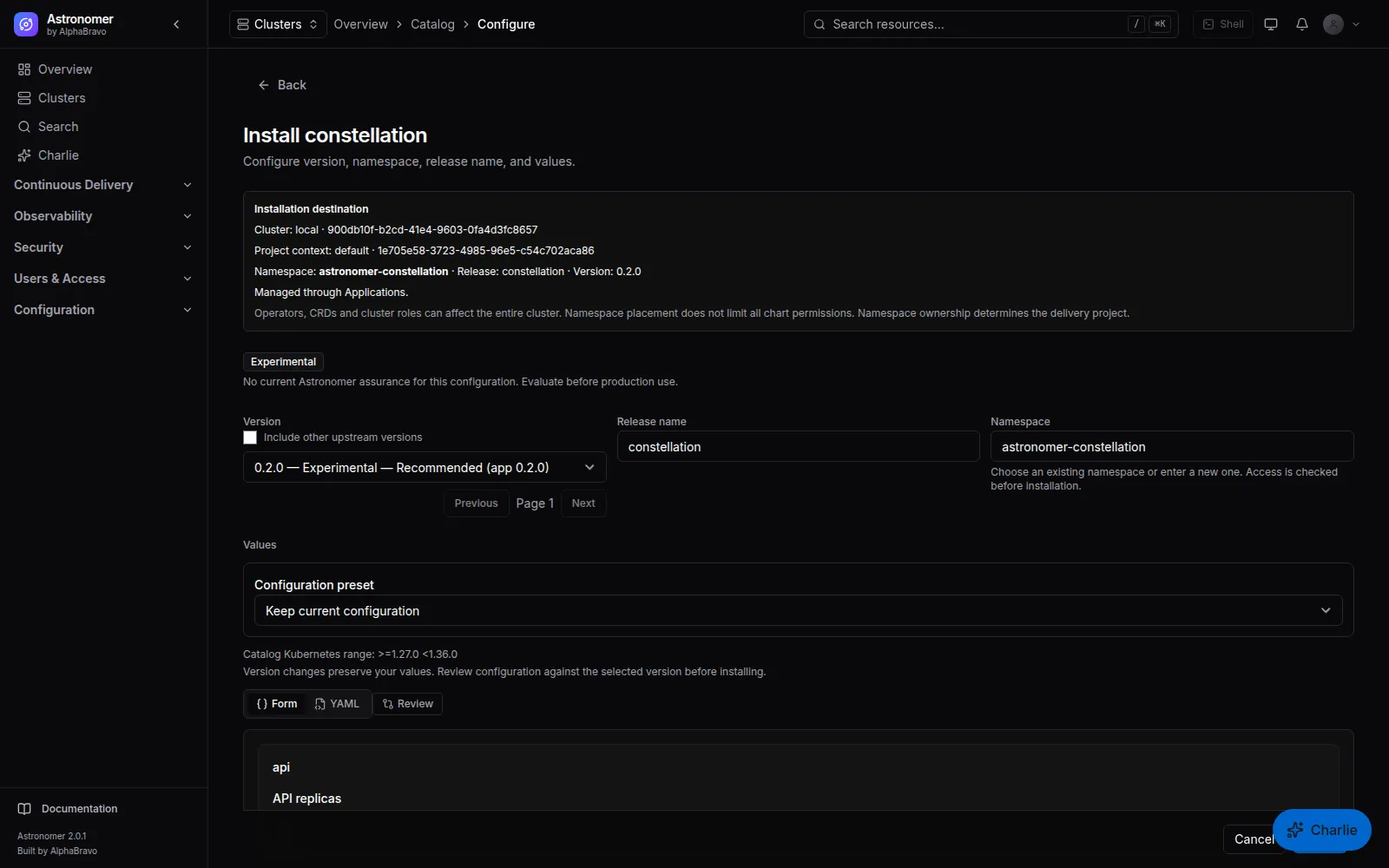
Astronomer’s install form for Constellation surfaces a curated set of chart values. Everything else stays available as full YAML values, so nothing in the chart is out of reach.
| Area | Settings |
|---|---|
| Release | Image tag |
| High availability | Enable, topology key, scheduling policy |
| Network | Network policies; Ingress class, host and TLS |
| API and console | API replicas, web console replicas |
| Scanner | Enable, replicas, concurrent scans per replica, persistent cache, cache size and StorageClass |
| Scanner engines | Syft, Trivy and Grype |
| Runtime agent | Enable, enforcement mode, network enforcement, deep packet inspection |
| Admission | Enable, replicas, webhook, failure policy and timeout |
| Database | PostgreSQL mode, existing Secret, embedded storage, CloudNativePG instances and storage |
| Certificates | cert-manager for admission TLS, issuer and issuer kind |
03 / ADMISSION COMPATIBILITY
Constellation’s default admission policies reject privileged, host-networked and host-PID workloads. Some of the platform tools Astronomer supports need exactly those capabilities.
When you install Constellation from the Astronomer catalog, Astronomer layers one values default: the system namespaces of its supported platform tools are excluded at the admission webhook’s namespace selector. That covers tools such as cert-manager, monitoring, logging, Kyverno and Gatekeeper, ingress, Longhorn, Velero and Istio.
Tenant namespaces are not on the list, so they still pass through every Constellation policy. The list is a default; replace it in your own values if your platform differs.
admission:
  webhook:
    namespaceSelector:
      matchExpressions:
        - key: kubernetes.io/metadata.name
          operator: NotIn
          values:
            - astronomer-cert-manager
            - astronomer-kyverno
            - astronomer-monitoring
            - cis-operator-system
            - istio-system
            # … the other supported tool namespaces
04 / SET IT UP TODAY
Constellation then runs on each cluster with its own console and sign-in.
Learn what Constellation doesRegister each cluster in Astronomer and apply the agent manifest. Wait for the agent and Flux to report ready.
Open the cluster’s Apps page, choose Constellation, set the curated values or edit YAML, review and install into astronomer-constellation.
05 / WHAT THIS DOES NOT DO
Be clear about the boundary when you plan an evaluation.
Constellation’s findings, runtime events and compliance results are in Constellation’s console. Astronomer’s console does not show them.
Constellation’s admission policies and Astronomer’s Pod Security, Gatekeeper and network policy templates are configured separately.
Each product has its own accounts and single sign-on settings. Constellation’s optional Astronomer token mode expects JWKS-verified RS256 or ES256 tokens, which Astronomer’s HS256 session tokens are not, so the two do not share sign-in today.
Both products are in alpha. Evaluate the combination on non-production clusters.
FAQ
No. Constellation runs on its own with its own sign-in. Astronomer adds a governed way to install and upgrade it across many clusters. #
No. Astronomer includes Trivy image scanning, CIS scans and policy templates on its own. Constellation is an optional catalog application. #
Yes. They are a values default layered by Astronomer’s catalog install. Replace the list in your own values override. #
Not today. Each product has its own accounts and single sign-on configuration. Point both at the same identity provider if you want one set of corporate credentials. #
NEXT STEP
Tell AlphaBravo about your clusters and security tooling. We will walk through installing Constellation from the catalog.